
Salesforce Marketing Cloud (SFMC) gives marketing teams the infrastructure to personalize email campaigns at scale, but having the tools and using them effectively are two different things. Salesforce’s 2026 Tenth Edition State of Marketing report, based on 4,450 marketing decision makers worldwide, found that 75% of marketers have adopted AI yet still use it to send generic campaigns. The same report found that 83% of marketers say customers increasingly expect brands to support back-and-forth, personalized conversations, not broadcast messaging. SFMC’s personalization features, including dynamic content, Data Extensions, and Journey Builder, exist specifically to close that gap.
In this post, we’ll cover:
- Why email personalization matters
- How to use data for targeted personalization
- How dynamic content works in SFMC
- How to tailor email frequency by customer behavior
- How to personalize subject lines
- How Journey Builder enables multi-step campaigns
- FAQs
Key Takeaways
- Email personalization in SFMC goes beyond first-name tokens: it combines Data Extensions, dynamic content blocks, AMPscript, and Journey Builder to deliver context-specific messages at every touchpoint.
- Data Extensions store customer attributes from CRM systems, website activity, and purchase history in a flexible format that enables precise targeting across campaigns.
- Dynamic content and AMPscript allow a single email template to render differently for each subscriber based on rules you define, without creating multiple separate emails.
- Journey Builder enables behavior-triggered, multi-step campaigns that adapt to what a customer actually does, not just when they were last contacted.
- Preference Centers reduce unsubscribe risk by letting customers control their own email frequency and content preferences directly.
- Einstein Recommendations uses historical data and interactions to predict which content or products each subscriber is most likely to engage with.
Why does email personalization matter?
Email personalization increases relevance, and relevance drives the metrics that matter: open rates, click-through rates, conversions, and customer retention. It goes beyond addressing a recipient by their first name. Effective personalization means delivering content that reflects each recipient’s behavior, preferences, and stage in the customer lifecycle, not a version of the email that was designed for everyone and therefore optimized for no one.
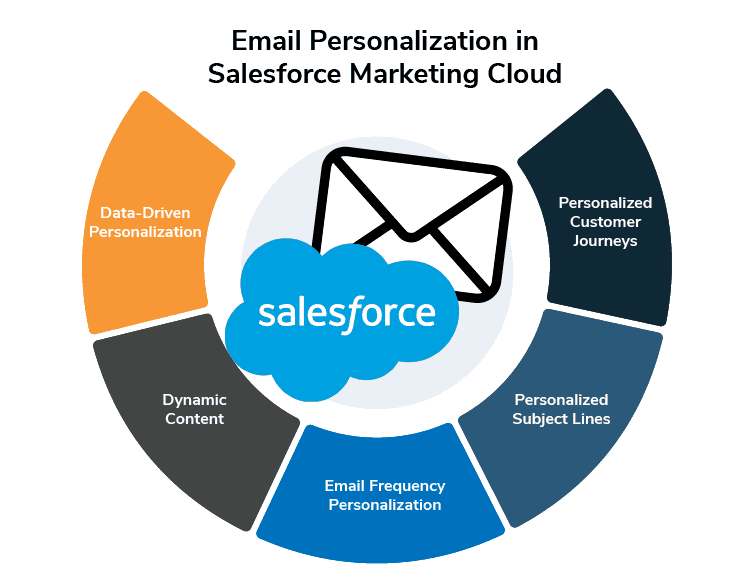
SFMC provides the infrastructure to make this work at scale, through dynamic content, personalization strings, audience segmentation, and behavior-triggered automation. The sections below cover how to use each effectively.
How do you use data for targeted personalization in SFMC?
Data is the foundation of every personalization decision in SFMC. The more precisely you can describe your audience, the more relevant your emails can be. SFMC integrates data from CRM systems, website activity, and purchase history to enable targeting that goes beyond basic demographics.
Use Data Extensions for flexible customer data storage. SFMC’s Data Extensions store customer data in a structured, queryable format that goes well beyond the standard subscriber fields. Use them to store attributes like product preferences, account tier, purchase history, or engagement scores that you can then use to drive targeting and content decisions.
Segment your audience before you personalize. Personalization at the individual level starts with segmentation at the group level. Build audience segments based on demographics, behavioral patterns, and engagement history. Sending different content versions to different segments delivers more relevant experiences than personalizing a single undifferentiated send.
Use Einstein Recommendations for predictive personalization. Einstein Recommendations in SFMC predicts customer preferences based on historical data and interactions. Use it to surface product recommendations, content suggestions, or next-best-action prompts that are calculated per subscriber rather than selected manually.
How does dynamic content work in Salesforce Marketing Cloud?
Dynamic content in SFMC lets you change sections of an email based on the recipient’s data. A single email template can deliver a different experience to each subscriber based on attributes like location, purchase history, engagement level, or any field stored in your Data Extensions. You build the rules once; SFMC renders the correct version at send time.
Use personalization strings for inline data. Personalization strings insert dynamic values directly into your email subject lines and body copy, such as the recipient’s first name, company, or location. They are the simplest form of personalization in SFMC and the fastest to implement.
Use AMPscript or Dynamic Content Blocks for rule-based personalization. AMPscript is SFMC’s scripting language for conditional content. Use it to show or hide content blocks, pull in product recommendations, or render different offers based on subscriber attributes. Dynamic Content Blocks give you a visual interface to accomplish similar outcomes without writing code. Both allow the same email template to deliver meaningfully different experiences to different segments.
Always preview and test dynamic content before sending. SFMC lets you preview emails with dynamic content rendered for specific subscribers or segments. Use this before every send to confirm that each content variant displays correctly and that no subscriber receives a broken or empty content block.
How do you tailor email frequency based on customer behavior?
Not every subscriber wants the same volume of email, and sending at a frequency that doesn’t match a customer’s expectations is one of the most reliable ways to drive unsubscribes. SFMC gives you two primary tools for managing frequency at the subscriber level: Preference Centers and Journey Builder.
Build Preference Centers that give subscribers control. Email Preference Centers in SFMC let subscribers choose how often they want to hear from you and what types of content they want to receive. Customers who set their own preferences are significantly less likely to unsubscribe because the communication reflects what they asked for. Preference Centers also give you declared data about subscriber intent that you can use to inform other targeting decisions.
Use behavioral triggers to drive timing, not just scheduling. Behavioral Triggers in SFMC let you respond to specific customer actions, such as website visits, cart abandonment, or product page views, with emails that fire based on that behavior rather than on a calendar schedule. A triggered email sent immediately after a relevant customer action will consistently outperform a scheduled send timed by campaign calendar.
Test frequency systematically. Monitor engagement metrics across different send frequencies to find the range that maintains engagement without fatiguing your list. Test suppression windows, re-engagement thresholds, and send cadence variations before drawing conclusions about what your audience prefers.
How do you personalize email subject lines in SFMC?
The subject line is the first decision a subscriber makes about your email, and personalization at that point influences open rates before the content itself has any opportunity to drive engagement.
Use AMPscript or personalization strings to include subscriber data. SFMC lets you insert subscriber attributes directly into subject lines using personalization strings or AMPscript. The recipient’s first name, location, or a reference to a recent interaction can make a subject line feel directly addressed rather than broadcast.
Reference relevant offers or behavior in the subject line. Tie your subject line to something the subscriber has actually done or expressed interest in: a product category they’ve browsed, a previous purchase, or a preference they’ve declared. A subject line like "New arrivals in the category you purchased from last quarter" is more relevant than a generic promotional line, even if both recipients receive the same offer.
A/B test subject line variants before committing to scale. SFMC’s A/B testing tools let you send different subject line versions to subsets of your list before determining a winner. Test one variable at a time (personalization token vs. no token, question vs. statement, length) so you can attribute performance differences accurately.
How does Journey Builder enable multi-step personalized campaigns?
Journey Builder in SFMC is a campaign planning tool that lets you design automated, multi-step email sequences that adapt to what each customer actually does. Rather than sending a fixed series of emails on a predetermined schedule, Journey Builder evaluates each contact at every step and routes them based on their behavior.
Set up behavior-triggered entry points. Journeys can begin based on customer actions: signing up for a newsletter, making a purchase, abandoning a form, or reaching a milestone. Behavior-triggered entry ensures the first communication in a journey is timely and contextually relevant, rather than tied to when you happen to run a campaign.
Use split paths to branch by behavior. Split paths in Journey Builder route contacts down different email sequences based on what they do within the journey. A contact who clicks a product recommendation goes down a different path than one who ignores it. This creates journeys that adapt to individual behavior rather than treating all contacts as a single audience moving through the same sequence.
Use SFMC’s send-time optimization for timing. Journey Builder includes data-driven send time optimization that delivers emails at the time each individual subscriber is most likely to engage, based on their historical open and click patterns. This operates at the subscriber level, not the campaign level.
Frequently Asked Questions
What is email personalization in Salesforce Marketing Cloud?
Email personalization in SFMC is the practice of using subscriber data, behavioral signals, and platform features including Dynamic Content, AMPscript, Data Extensions, and Journey Builder to deliver emails whose content, timing, and subject lines are tailored to each recipient. It ranges from simple personalization strings that insert a subscriber’s name to complex conditional logic that renders entirely different email content based on purchase history or engagement behavior.
What is the difference between AMPscript and Dynamic Content Blocks in SFMC?
Both tools enable conditional content in SFMC emails, but they operate differently. AMPscript is a scripting language that you embed directly in email HTML to write logic-based personalization, pull data from Data Extensions, and build complex conditional rules. Dynamic Content Blocks provide a visual, no-code interface for showing or hiding content sections based on subscriber attributes. AMPscript offers more flexibility for complex use cases; Dynamic Content Blocks are faster to implement for rule-based scenarios that don’t require custom logic.
How do Data Extensions support email personalization in SFMC?
Data Extensions store customer attributes in a structured, queryable format that SFMC can reference at send time. Unlike standard subscriber fields, Data Extensions are flexible: you define the schema, store any attribute you need (purchase history, account tier, product preferences, engagement scores), and then use those attributes to drive audience segmentation, dynamic content rules, and personalization strings. Data Extensions are the data layer that makes most advanced personalization in SFMC possible.
What is Journey Builder and how does it support personalization?
Journey Builder is SFMC’s campaign planning tool for designing automated, multi-step communication sequences that adapt to customer behavior. It supports personalization by routing contacts through different email paths based on their actions, triggering entries based on behavioral events rather than calendar schedules, and delivering emails at optimized send times per subscriber. It connects personalization at the content level (what the email says) with personalization at the journey level (when and why the email is sent).
How do you measure the success of email personalization in SFMC?
SFMC tracks open rates, click-through rates (CTR), conversion rates, and unsubscribe rates at the campaign and journey level. For personalized campaigns, the most useful comparisons are segment-level performance differences (does Segment A outperform Segment B?) and A/B test results (does the personalized version outperform the control?). Journey Builder also provides path-level analytics that show how contacts move through split paths, which lets you evaluate which personalization rules are driving engagement and which are not.
GNW Consulting is a certified Salesforce partner specializing in Salesforce Marketing Cloud implementation and marketing operations for B2B organizations. For questions about SFMC personalization setup, Data Extension architecture, or Journey Builder configuration, *contact our team* or explore our *Salesforce Marketing Cloud services*.
